Quick Reference Guide - AURA vs Legacy format: For non-touch screen Z6 Follow

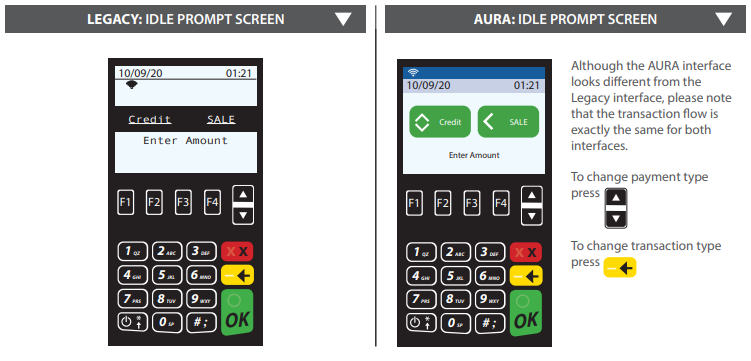
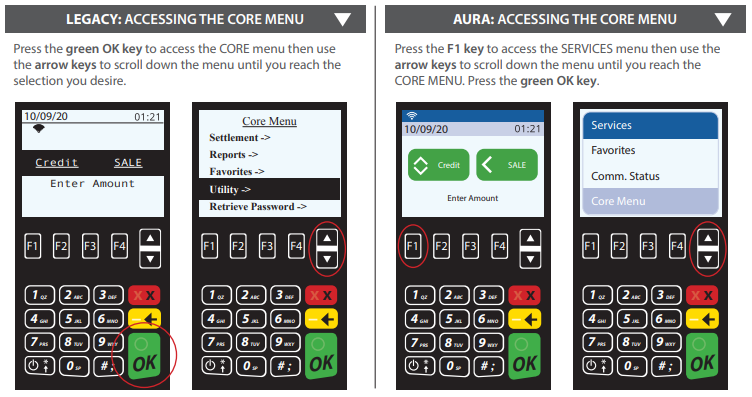
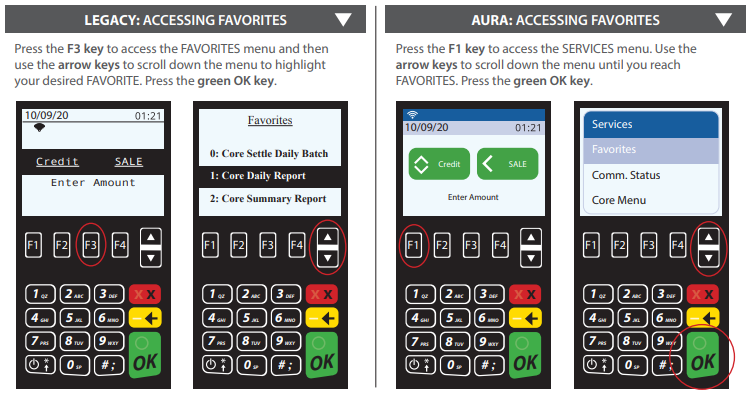
The interface for the Z6 non-touchscreen terminal has been updated with new software, designed to enhance and improve the user experience. We call it AURA. Although the AURA interface looks different from the Legacy interface, the differences in support and functionality are minimal, with virtually no changes. The images in this article directly compare the LEGACY method vs. the AURA method for the following actions.: Idle Prompt Screen, Accessing the Core Menu, and Accessing Favorites
The following actions remain the same:
• Building a TPN in STEAM
• Accessing data in DeNovo
• Downloading a terminal
• Terminal menus
• Transaction flow
• Same host platform certifications
The following actions are different:
• Smart device-type look with a sleeker, more modern layout
• Menus, Favorites and Call Me are all accessible using the
F1 key (you now use one button instead of three!)
• In STEAM, an AURA software model can be identified by having ‘AURA’ in the name eg. V3AURACoreF w CrDb_20200915
Idle Prompt Screen
Accessing the Core Menu
Accessing Favorites
Comments
0 comments
Article is closed for comments.